Skip to content

Maqam · Hifz is here

See exactly where your recitation differs.Practice until you can recall the ayah.

Choose one of 12 Qaris, recite the same passage, and compare your melody, pacing, pauses, and endings. Then use Flow or Hifz Coach to read, repeat, and recall it.

Hifz is available on iPhone and Android.

Maqam 2.0 Flow on iPhone, with matched words in green and a confirmed missed word in red.
From your voice to the page.
See what is new in 2.0
Qari · referenceYou · your take

01 / The practice

Two ways to return
to the ayah.

01 · ImitateiPhone + Android

Imitate a Qari.

Choose a reciter. Recite the same ayah. See your melodic shape and timing against the reference.

ChooseReciteCompare
See the comparison
02 · HifziPhone + Android

Return from memory.

Read from the Mushaf, hide the words, and recite from memory. Use guided repetitions when you want more structure.

ReadRepeatRecall
Explore Hifz

02 / New in Maqam 2.0

From reading the page
to recalling it.

iPhone + Android

Flow

Read, hide, and recite one Mushaf page at a time. Save bookmarks, see coverage by ayah, and return to words marked for revision.
  1. Read the page.Choose your surah and ayah range.
  2. Hide the words.Keep the page in view and recall it from memory.
  3. Return and revise.Review the words that need another repetition.

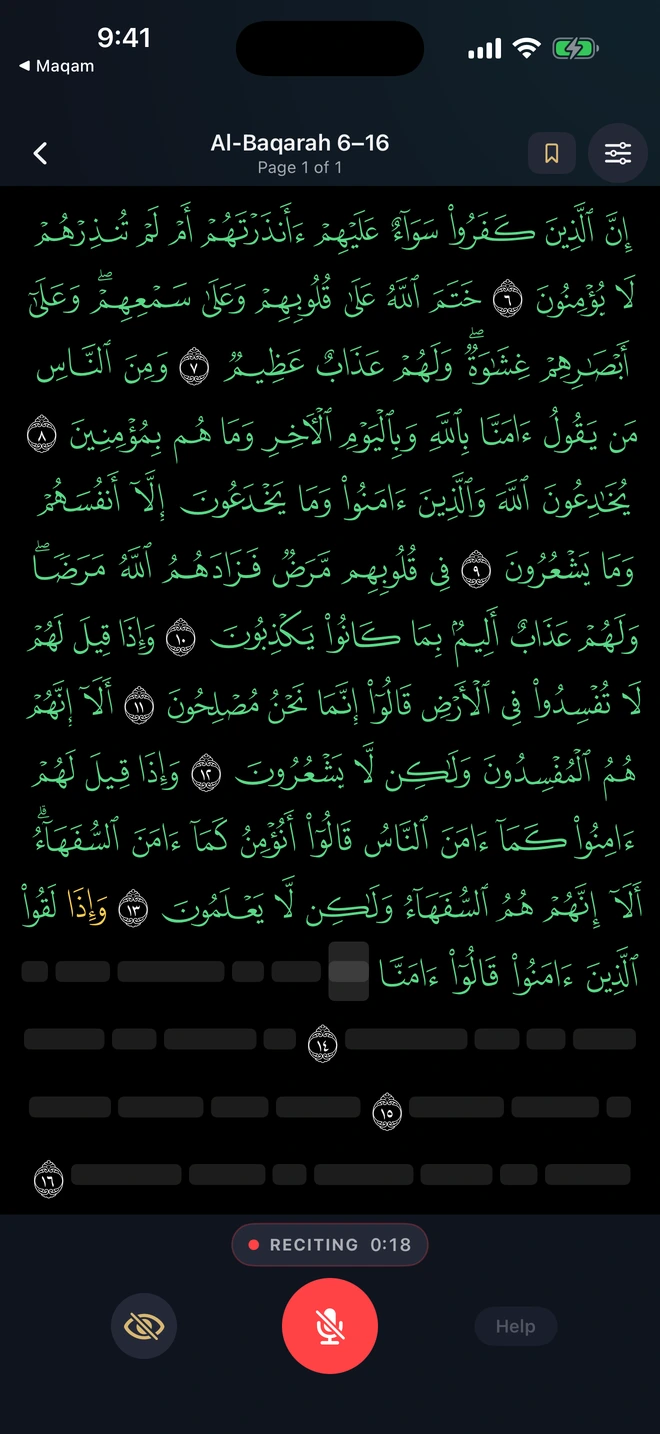
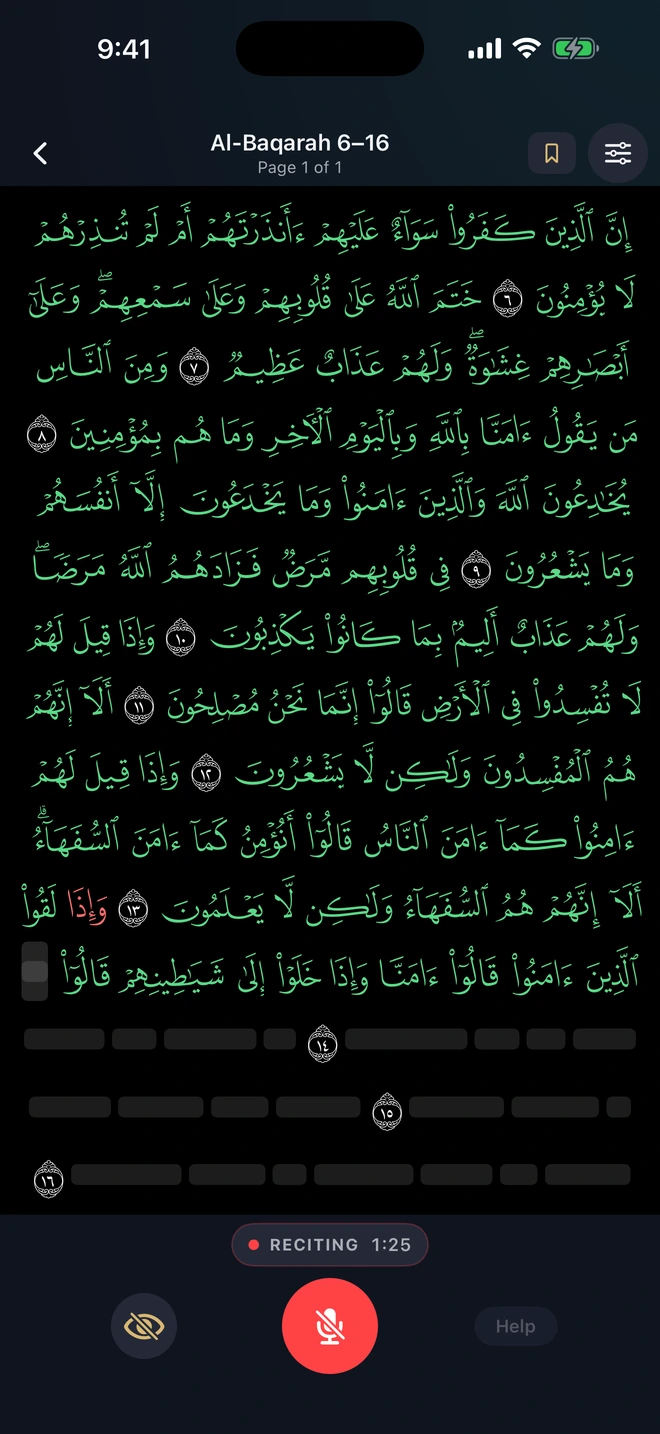
Yellow marks a word that could not yet be verified. Red marks a confirmed miss to return to and review.

The word trail is a reading and recall aid. It does not grade tajweed or certify memorization. Prove is optional and uses the existing Qari-comparison score.

Maqam Pro More Hifz Coach sessions and a repetition count from 1 to 50. Flow has no daily practice limit.

Flow practice in Al-Baqarah: matched words are green and an unverified word is highlighted yellow.
01 · Yellow: a word to verify
The same Flow practice after the missed word is confirmed in red, with matched words green and unreached words hidden.
02 · Red: a confirmed miss
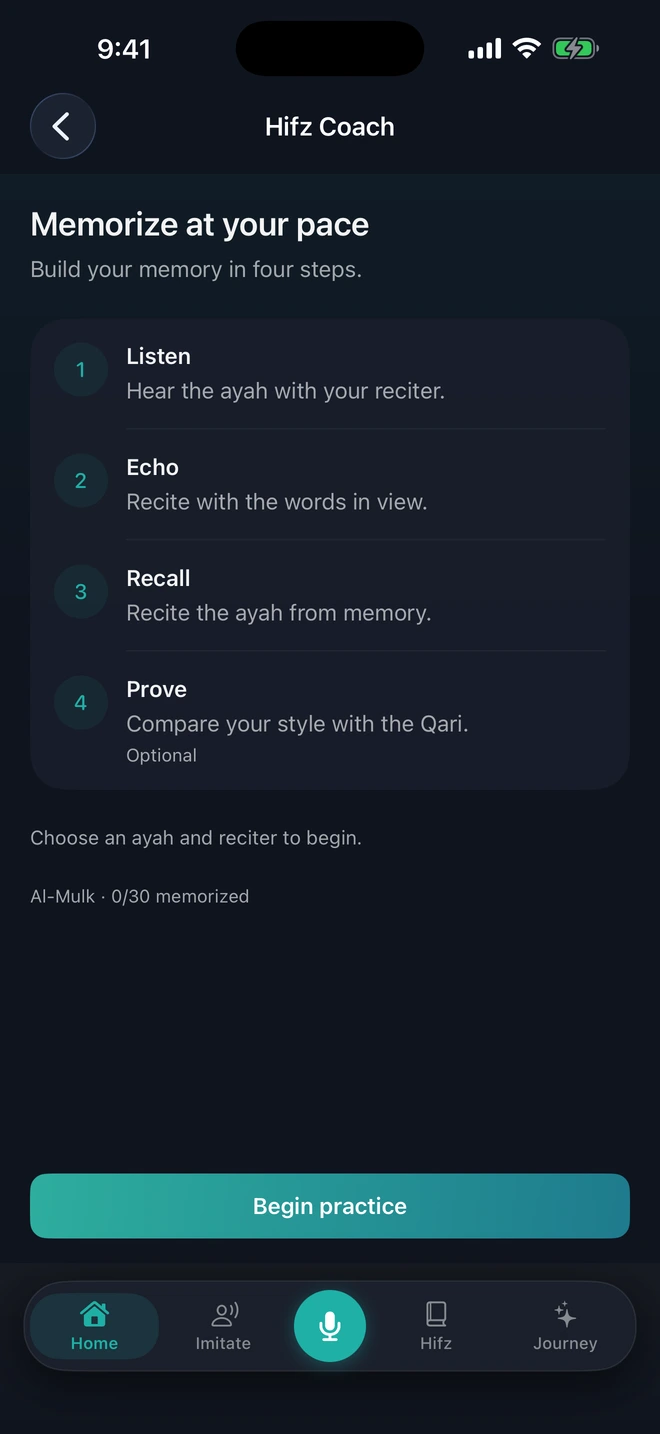
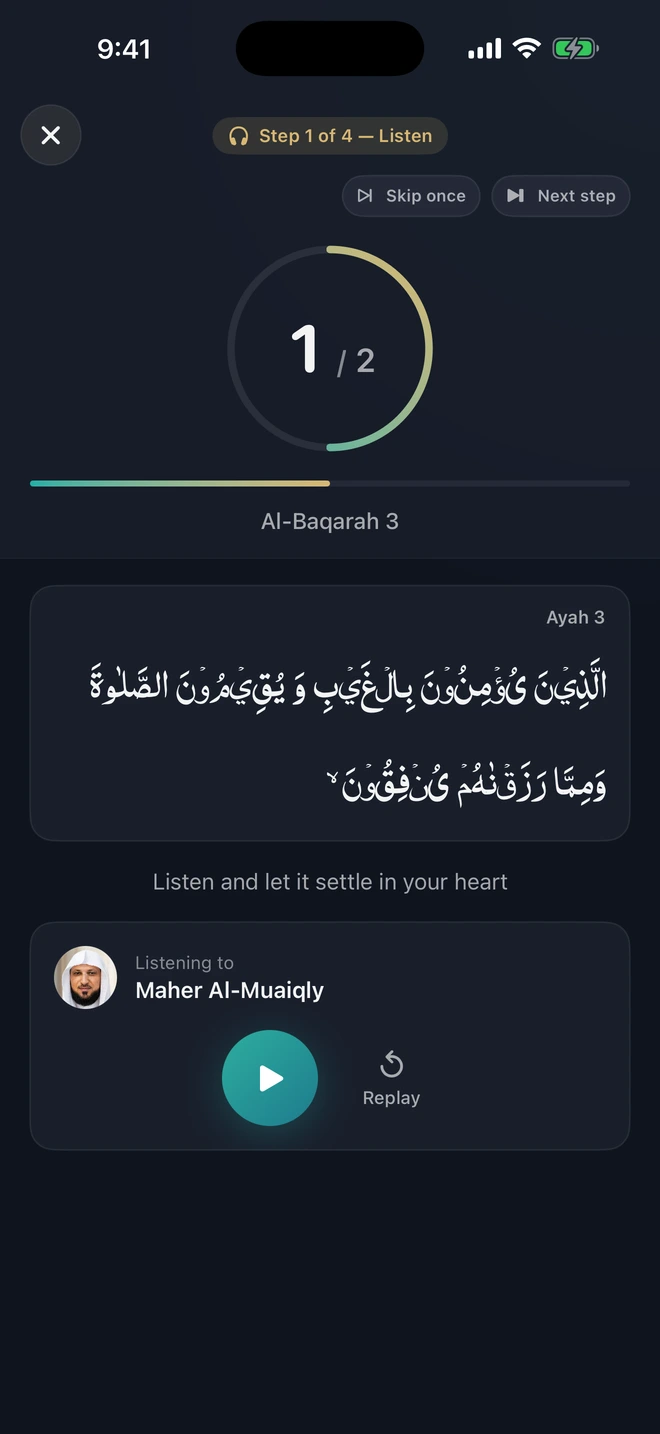
The real Hifz mode picker with Flow and Hifz Coach, showing Listen, Echo, Recall, and optional Prove.

Choose your pace.

Flow for page-by-page practice. Hifz Coach for guided repetitions: Listen → Echo → Recall → Prove.

Maqam’s real Memorization progress screen, with recited and memorized coverage kept distinct.

Keep your place.

See your memorization coverage. Return to a saved range or review the words that need practice.

Hifz is available on iPhone and Android. Screens shown from the current app.

03 / The comparison

Two voices.
One shared timeline.

Follow the gold reference and your emerald take. Find the late entry, the pitch drift, and the hold to repeat.

Qari · referenceYou · your take

Late entry

+310 ms after the Qari

Pitch drift

40 cents below the reference

Shortened hold

Your 0.9 s · Qari 1.8 s

Illustrative comparison. Your results come from your own recording.

04 / Listen to the difference

One score.
Four parts you can practice.

Start with your overall comparison. Use the fuller breakdown in Maqam Pro to choose what to repeat.

01

Melody Shape

Compare where your pitch rises and falls across each phrase.

02

Pacing

Find where you enter late, rush ahead, or slow down.

03

Pauses & Holds

Compare the placement of pauses and the length of held notes.

04

Ending Control

Hear how you finish each phrase against the reference.

Stability contributes to the overall comparison; it is not a separate result card.

Hear the moment.
Know what to repeat.

“What to improve” marks up to five ranked moments on a timeline. Listen to Reference and Mine for each moment, then return to the phrase with a clear practice cue.

ReferenceMine

Word-level review appears when analysis is available and sufficiently confident.

Maqam Pro

A plan for your next take.

Training plans, guided drills, Qari Path, and the fuller result breakdown belong to Maqam Pro. Listen, repeat a focused phrase, and review your next take.

Free practice includes an overall score and pitch comparison. Check the app for current limits and subscription details.

05 / The Mushaf

Read, imitate, and memorize from the same Mushaf.

Keep the ayah at the center of your practice.
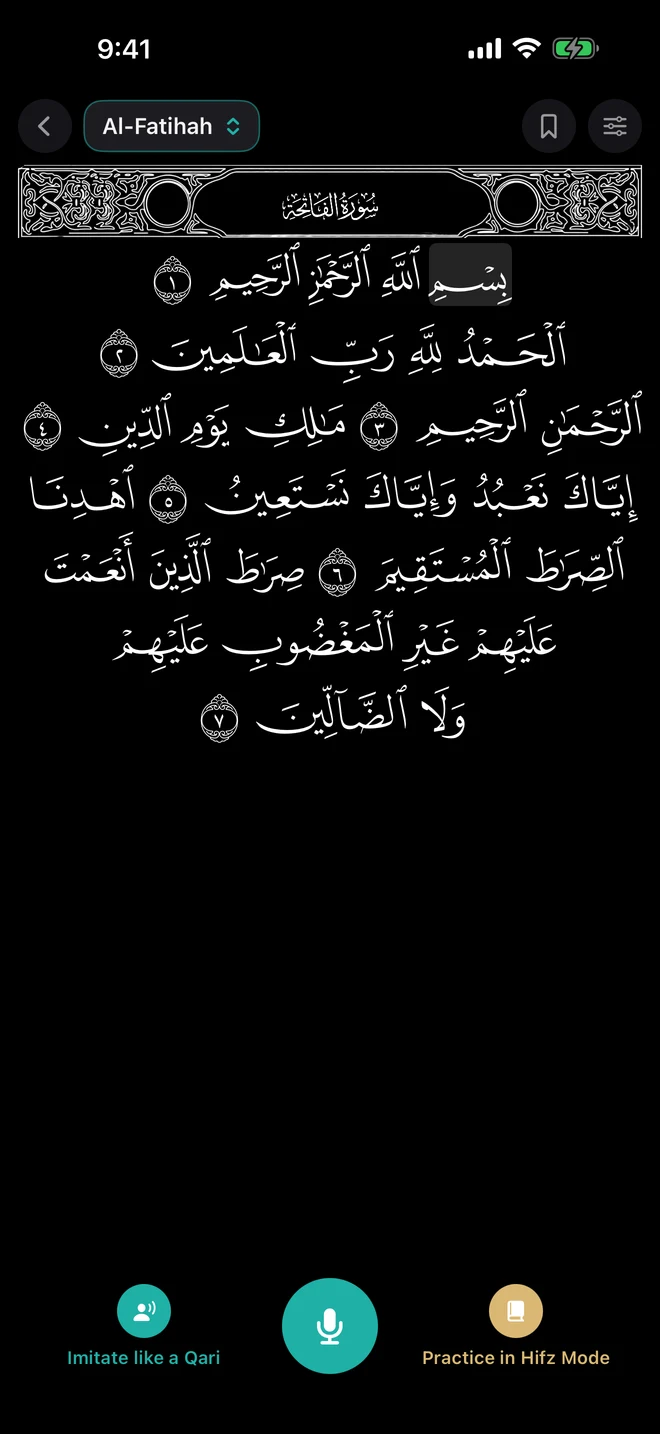
  • Ayah View or Mushaf View. Study one ayah or read a fixed printed page.
  • IndoPak and Uthmani. Choose your script, with light and dark appearance.
  • Follow the Qari. Gold word-following keeps your place during reference playback.
  • Open Read from the center microphone. Choose reading, Imitate, or Hifz from the Mushaf.
  • Listen with the screen off. Passive listening includes lock-screen controls.

Hifz is available on iPhone and Android.

Read in Maqam 2.0: the real Mushaf with Imitate, microphone, and Hifz actions.
The Read screen · iPhone

06 / Your journey

Style progress and memorization, kept separate.

Your recitation practice.

Imitate progress follows your comparison scores. See how your practice changes across saved takes.

Your memorization.

Hifz has its own progress. Memorized ayat receive gold rings on the Surah Map.

Both habits, in view.

The weekly strip shows Imitate and Hifz practice together, with each habit kept distinct.

Then vs Now.

Compare your first and latest saved takes on the same ayah. Hear each from the recordings on your device.

In Journey: Surah Map · Practice Hub · Memorization · Hifz Planning · Revise with Game · score history.

Maqam Pro Training plans, Qari Path, and the full Surah Map.
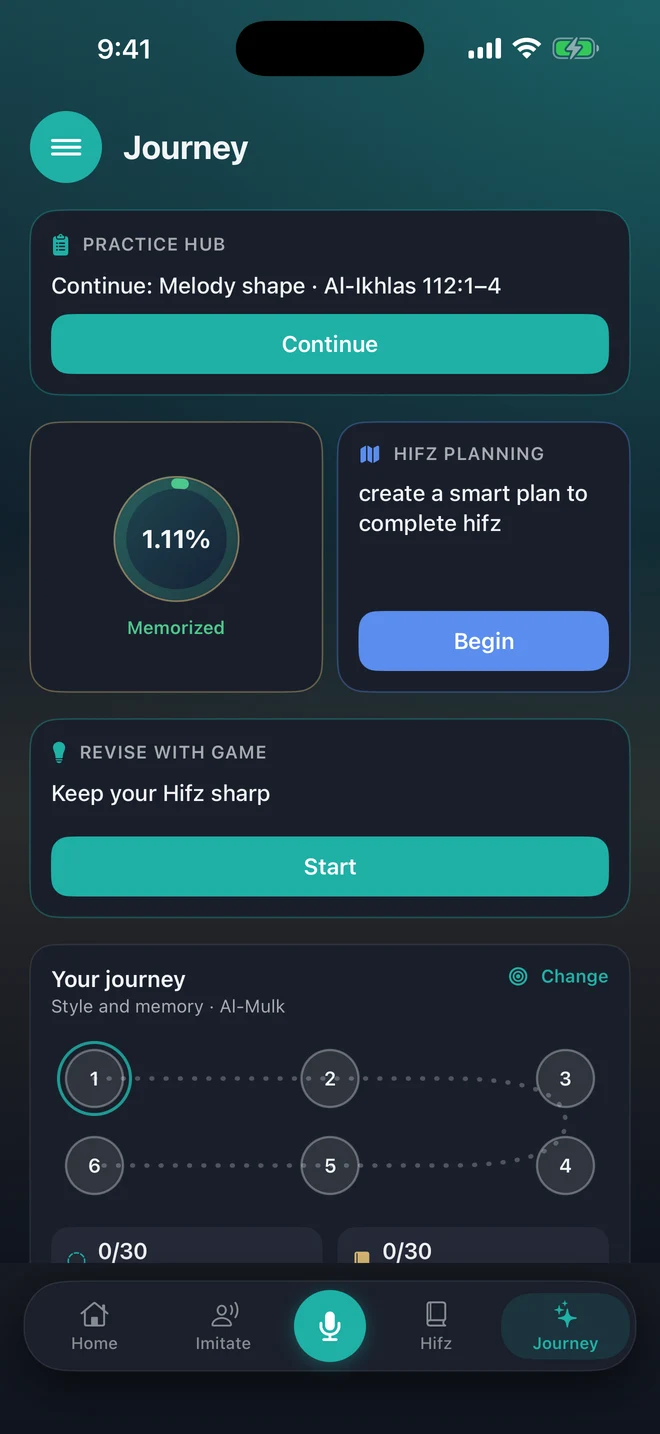
Maqam 2.0 Journey: Practice Hub, Memorization, Hifz Planning, revision game, and separate style and memory progress.
Journey · iPhone 2.0

07 / Around the practice

A clearer next step.
A reason to return.

01

Find the Nearest Master Style

Compare one short-surah recording with 12 Qaris. Find the closest melody and timing pattern to practice against.

02

Recite Together

Alternate ayahs with a Qari. Listen, take your turn, then play the session back.

03

Notice the room

A recording-environment warning flags background noise while you recite and puts affected results in context.

04

Smart Practice Hub

Return to your current focus, training plans, and next practice action in one place.

Maqam Pro
05

Qari Path

Choose a favorite Qari and a surah. Practice from the first ayah to the last.

Maqam Pro
06

Keep your takes

Save recordings on your device. Listen again when you want to review your recitation.

08 / Trust & adab

Measured with care.
Used with adab.

Maqam compares acoustic patterns against a selected reference. It does not judge tajweed, issue rulings, or replace a qualified teacher.

The Qur’anic text stays static, legible, and undistorted. The comparison lines describe sound.

  • Scoring takesProcessed for analysis, then deleted from analysis systems by default.
  • Saved takesRemain on your device. Scores and progress can sync after sign-in.
  • Product-improvement audioOptional storage requires separate consent. It is off by default.
  • Your consentTurning it off stops future archive uploads. It does not itself delete copies already stored; the Privacy Policy explains deletion requests.
Read the Privacy Policy

09 / Common questions

Before you
begin.

Maqam · Return to the ayah

Practice the recitation.
Remember the ayah.

Hifz is available on iPhone and Android.